Nspawn comeback: an OCI hub, new images and nspawn 1.0.0
Where we left it
If you used nspawn before, you probably remember it as a small Bash script. nspawn -i <distribution>/<release>/tar read https://hub.nspawn.org/storage/list.txt, picked a tarball and ran machinectl pull-tar on it, with the checksums signed by our master key and imported into /etc/systemd/import-pubring.gpg. It worked, but the last release (0.6) is from 2022. There was a Rust rewrite on a branch that never got merged, the images stopped being rebuilt, and in 2024 everything went quiet. The blog too: the last post here is about WiFi adapters, from January 2024.
Last week I picked it up again. The result, as of today:
- hub.nspawn.org is an OCI registry.
- The images are built by mkosi on GitHub Actions and pushed to the hub.
- nspawn 1.0.0 is out: a rewrite in Rust that pulls OCI images and manages the machines through systemd-machined, over D-Bus.
- nspawn.org has new documentation.
Why not just revive the old setup
The first idea was to do exactly that: rebuild the tarballs and keep using machinectl pull-tar. A few things made it a bad idea:
machinectl pull-*moved toimportctlin systemd 256. The old script would need a rewrite anyway.- Parsing the output of
machinectlorimportctlis fragile, it’s not a stable API. Everything useful (pull progress,OpenMachineShell, transient units) is on the bus. importctl pull-ociexists now, but it writesBoot=nofor OCI images, which is wrong for images whose entrypoint is systemd.
I also spent a couple of days building the images on OBS (build.opensuse.org) as tar.xz. It did not go well: no OCI output from the mkosi recipe, no base project for CentOS Stream, no usable mkosi for Alma or Rocky, and the download CDN served a stale tarball next to a fresh SHA256SUMS, so importctl refused it with “DOWNLOAD INVALID”. OBS got dropped.
So the decision was: OCI images, a real registry, and a client that does the pull and the assembly itself.
hub.nspawn.org is an OCI registry now
The hub runs zot. I looked at Distribution, Harbor and Forgejo’s package registry too:
- Distribution’s auth is all or nothing with htpasswd. Anonymous pull with authenticated push needs a token server.
- Harbor is too heavy for what we need.
- Forgejo has no
/v2/_catalog, whichnspawn hub lsuses to list the repositories.
zot does anonymous pull and authenticated push out of the box, deduplicates blobs, runs GC online and comes with a small web UI, so you can browse the images at hub.nspawn.org. Since it’s a normal registry, any OCI client works too, or plain curl:
1
2
$ curl -s https://hub.nspawn.org/v2/fedora/tags/list | jq -c .tags
["43","43-20260922","43-20260923","44","44-20260922","44-20260923","latest","rawhide","rawhide-20260922","rawhide-20260923"]
Moving tags (44, latest) always point to the last build. The dated tags (44-20260923) are fixed and the registry keeps the last 10 of them per repository, so you can pin a build if you need to.
mkosi-definitions
The images come from nspawn/mkosi-definitions, the same repository as before, reorganized after the layout that systemd and ParticleOS use for their own mkosi trees. The root mkosi.conf sets what every image shares:
1
2
3
4
5
6
7
8
9
10
11
12
13
14
15
16
17
18
$ cat mkosi.conf
[Build]
ToolsTree=default
ToolsTreeDistribution=fedora
ToolsTreeRelease=44
Incremental=yes

[Output]
Format=oci
CompressOutput=zstd
ImageId=%d
ManifestFormat=json
Output=%i_%v_%a

[Content]
Bootable=no
Initrds=
Hostname=%d-%r
and then mkosi.conf.d/<distro> has the per-distribution bits (every image gets systemd-networkd and systemd-resolved, that’s how it gets an address on the nspawn bridge), and mkosi.profiles/ has the service and development images. mkosi.bump is just date -u +%Y%m%d, which becomes the image version and the dated tag.
What gets built is listed in images.json, which is the CI matrix:
1
2
3
4
5
$ jq -c '.[] | select(.repo == "fedora" or .repo == "nginx")' images.json
{"distro":"fedora","release":"44","repo":"fedora","tags":"44 latest"}
{"distro":"fedora","release":"43","repo":"fedora","tags":"43"}
{"distro":"fedora","release":"rawhide","repo":"fedora","tags":"rawhide"}
{"distro":"debian","release":"trixie","profile":"nginx","repo":"nginx","versionof":"nginx"}
Service images like nginx take their tags from the package version in mkosi’s manifest (1.26.3, 1.26, latest). Right now there are 50 entries:
- 19 distribution images: Arch, Debian, Ubuntu, Fedora, CentOS Stream, AlmaLinux, Rocky, openSUSE and Kali.
- 23 services, from nginx and PostgreSQL to Forgejo and Grafana.
- 4 toolboxes and 5 language images.
On a pull request, .github/select-images.py looks at the diff and builds only the images the change affects. Changing the nginx profile builds nginx, not 50 images. On merge the images are pushed with skopeo copy, and every Sunday all of them are rebuilt to pick up updates.
A few things that bit me on the way, in case you write your own mkosi trees:
History=yesmakes later invocations reuse the distribution of the last build, ignoring-d. Useless when one tree builds many distributions.%iinOutput=expands before the distribution’s drop-in setsImageId=, so the outputs came out asarch_*for an image calledarchlinux. SettingOutput=again afterImageId=fixes it.- Kali’s keyring is not in the Fedora tools tree. It goes in
mkosi.conf.d/kali/mkosi.sandbox/, with the apt sources, and mkosi picks it up there. alma.confsorted before thecentos/directory and lost its settings, so the three EL distributions now shareel/plus anel-<name>.confeach.
nspawn 1.0.0
The client is a new program. It’s written in Rust and never calls machinectl or importctl: it talks to the registry itself and to systemd-machined and systemd through D-Bus (zbus). The work is done by a service on the system bus, org.nspawn, with polkit deciding who can do what, and the command line is a client of it, the same way machinectl is a client of machined.
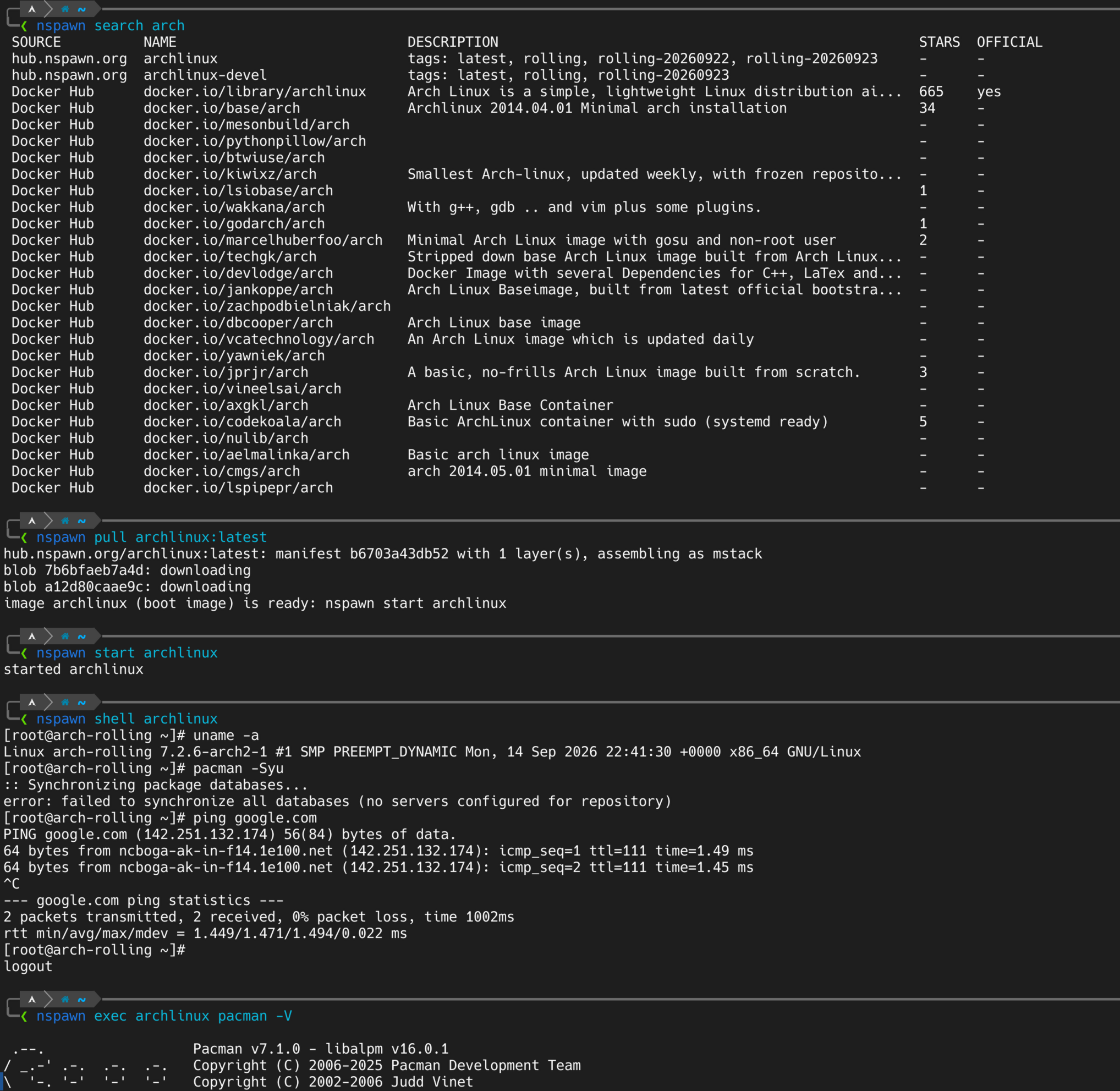
This is what it looks like, the same session as the cover image:
1
2
3
4
5
6
7
8
9
10
11
12
13
14
15
16
17
18
19
20
$ nspawn search arch
 SOURCE          NAME                          DESCRIPTION
 hub.nspawn.org  archlinux                     tags: latest, rolling, rolling-20260922, rolling-20260923
 hub.nspawn.org  archlinux-devel               tags: latest, rolling, rolling-20260923
 Docker Hub      docker.io/library/archlinux   Arch Linux is a simple, lightweight Linux distribution ai...
 ...

$ nspawn pull archlinux:latest
hub.nspawn.org/archlinux:latest: manifest b6703a43db52 with 1 layer(s), assembling as mstack
blob 7b6bfaeb7a4d: downloading
blob a12d80caae9c: downloading
image archlinux (boot image) is ready: nspawn start archlinux

$ nspawn start archlinux
started archlinux

$ nspawn exec archlinux pacman -V
# the exit code comes back, like docker exec
$ nspawn shell archlinux
# a login session through machined
Some details about how it works:
- Its own store. Layers, blobs and manifests live under
/var/lib/nspawn, not in/var/lib/machines. Otherwise machined lists every layer as an image, andmachinectl cleanremoves them. Layers are shared between images and garbage collected when nothing uses them. - Three backends.
overlay(overlayfs withmetacopy=on),flat(a plain copy) andmstack, which uses the managed user namespaces of systemd 261 through nsresourced and mountfsd. The pull above picked mstack because the host runs systemd 261. Machines and apps. Images whose entrypoint is an init system are booted. Anything else, Docker Hub images included, runs as PID 2 under nspawn’s stub init, with the entrypoint, environment and user from the OCI config:
1
2
$ sudo nspawn pull docker.io/library/nginx:latest --name web
$ sudo nspawn start web -p 8080:80
- Networking. nspawn manages its own bridge,
nspawn0(10.99.0.0/24 by default), with an nftables table for NAT and published ports. It doesn’t need systemd-networkd or NetworkManager on the host, and it gets along with firewalld, docker and ufw. - Unit hooks. Every machine’s unit gets a drop-in that calls nspawn around its life, so
machinectl start, a unit enabled at boot or a crash all set up and release the network the same waynspawn startdoes. - build and push.
nspawn build -t team/app:1 ./apprunsmkosi --format=ocion a directory and imports the result, andnspawn pushuploads it, skipping the layers the registry already has.
It needs systemd 255 or newer (255, 259 and 261 are tested). There are packages for Fedora (with an SELinux policy as a subpackage, nspawn-selinux), Debian/Ubuntu and Arch (nspawn and nspawn-git in the AUR), all attached to the release.
nspawn.org
The website was rebuilt with Hugo and Docsy. It has the documentation for 1.0.0: getting started, images, machines, networking, building your own images and the command reference. It’s self-hosted, next to the hub, because the About page says no IP addresses, user agents or timestamps are logged, and that’s something I can only say about a server I run.
What is missing
1.0.0 is usable, but some things are not there yet:
- Manifest signatures are not verified. Every blob is checked against its sha256 digest and the registry is only reached over HTTPS, but that’s not the same as a signature. Signing the images in CI with cosign is the plan.
- Only x86-64 images for now.
- No IPv6 on the bridge.
- The 1.1.0 list: labels read from the OCI config, restart policies, resource limits,
--jsonoutput,cpand removing machines without removing the image.
If something breaks, or you want an image that is not on the hub, open an issue or a pull request in the repositories below. Adding an image is usually one images.json entry and, for a service, a profile.
Thanks to Christian Rebischke, who started all of this, and to Septatrix, who restructured mkosi-definitions in 2025 while the rest of us were away.
References
- https://nspawn.org
- https://hub.nspawn.org
- https://github.com/nspawn/nspawn
- https://github.com/nspawn/nspawn/releases/tag/1.0.0
- https://github.com/nspawn/mkosi-definitions
- https://github.com/systemd/mkosi